
chooseAction
Sent whenever the player has priority and may take a legal action or pass - cast a spell, play a land, activate an ability, or do nothing. Unlike the modal prompts, the reference client doesn’t show a dialog for this: it highlights the available actions directly on the board.
Arguments
Section titled “Arguments”input.type is "chooseAction". The remaining fields:
interface ChooseActionInput { actions: Array<AvailableAction>;}#[serde(rename_all = "camelCase")]pub struct ChooseActionInput { pub actions: Vec<AvailableAction>,}
References: AvailableAction
Rendering
Section titled “Rendering”There’s no dialog - while you hold priority, each entry in actions is
highlighted in place.
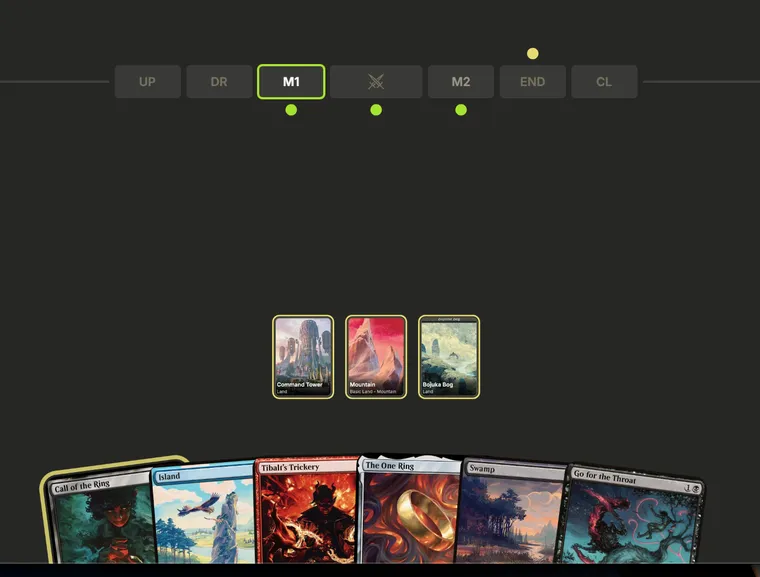
Available actions glow on the board: castable cards in hand, activatable
permanents, and the steps on the phase strip. Clicking a highlight sends
{ type: "act", actionId } for the matching action.
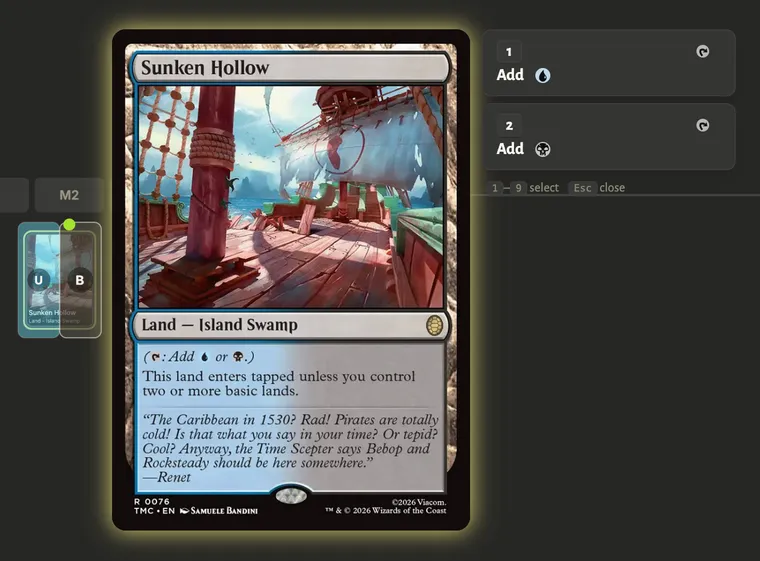
When one card offers several abilities, selecting it opens a small picker to choose which
activateAbility to use - here, Sunken Hollow’s two mana abilities.
Response
Section titled “Response”type ChooseActionOutput = | { type: "pass"; until?: PassUntil; exhaustStack: boolean } | { type: "restoreSnapshot"; checkpointId: number } | { type: "act"; actionId: string };
type PassUntil = { playerId: string; phase: StepKind };Send { type: "act", actionId } to perform an action by its id - including
tapping a mana source or untapping one (undoMana), which appear in actions
like any other entry. actionId MUST be an id advertised in this prompt’s
actions; anything else is rejected.
Send pass to pass priority; the optional until asks the engine to keep
auto-passing until playerId reaches phase (a StepKind).
exhaustStack: true asks the engine to keep auto-passing until every object
currently on the stack has resolved; the fast-forward ends early - priority
comes back with a fresh prompt - as soon as any new object (a spell, an
activated ability, or a trigger) is put on the stack, so the passing player
can respond to it.
Conceding is not a response - it is the out-of-band directive message
(see Answering a prompt), legal at any time.
Example
Section titled “Example”{ "promptId": 7, "decidingPlayerId": "player-0", "input": { "type": "chooseAction", "actions": [ { "id": "act-0", "type": "cast", "cardId": "hand-2", "mode": "cast", "modeLabel": "Cast Lightning Bolt" }, { "id": "tap:perm-5:0", "type": "activateAbility", "cardId": "perm-5", "abilityIndex": 0, "description": "{T}: Add {G}.", "isManaAbility": true, "producedMana": [{ "color": "G", "amount": 1 }] } ] }}{ "kind": "response", "promptId": 7, "action": { "type": "chooseAction", "output": { "type": "pass", "exhaustStack": false } }}